


How to interface 7-Segment Display with 8051 micrcontrollers?
The 7 segment display is found in many displays such as microwaves or fancy toaster ovens and occasionally in non cooking devices. It is just 7 LEDs that have been combined into one case to make a convenient device for displaying numbers and some letters. The display is shown on the left. The pin out of the display is on the right.
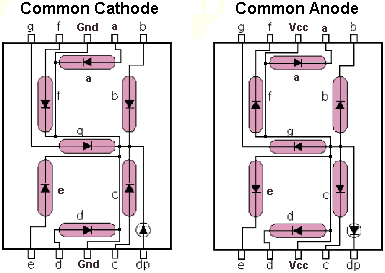
This version is a common anode version. That means that the positive leg of each LED is connected to a common point which is pin 3 in this case. Each LED has a negative leg that is connected to one of the pins of the device. To make it work you need to connect pin 3 to 5 volts. Then to make each segment light up, connect the ground pin for that led to ground. A resistor is required to limit the current. Rather than using a resistor from each LED to ground, you can just use one resistor from Vcc to pin 3 to limit the current. The following table shows how to form the numbers 0 to 9 and the letters A, b, C, d, E, and F. '0' means that pin is connected to ground. '1' means that pin is connected to Vcc.
|
To Display |
a |
b |
c |
d |
e |
f |
g |
|
0 |
0 |
0 |
0 |
0 |
0 |
0 |
1 |
|
1 |
1 |
0 |
0 |
1 |
1 |
1 |
1 |
|
2 |
0 |
0 |
1 |
0 |
0 |
1 |
0 |
|
3 |
0 |
0 |
0 |
0 |
1 |
1 |
0 |
|
4 |
1 |
0 |
0 |
1 |
1 |
0 |
0 |
|
5 |
0 |
1 |
0 |
0 |
1 |
0 |
0 |
|
6 |
0 |
1 |
0 |
0 |
0 |
0 |
0 |
|
7 |
0 |
0 |
0 |
1 |
1 |
1 |
1 |
|
8 |
0 |
0 |
0 |
0 |
0 |
0 |
0 |
|
9 |
0 |
0 |
0 |
1 |
1 |
0 |
0 |
|
A |
0 |
0 |
0 |
1 |
0 |
0 |
0 |
|
b |
1 |
1 |
0 |
0 |
0 |
0 |
0 |
|
C |
0 |
1 |
1 |
0 |
0 |
0 |
1 |
|
d |
1 |
0 |
0 |
0 |
0 |
1 |
0 |
|
E |
0 |
1 |
1 |
0 |
0 |
0 |
0 |
|
F |
0 |
1 |
1 |
1 |
0 |
0 |
0 |
Now, we want to run the display with the AT89C51 microcontroller. We will use Port 0 to run the display. Connect the AT89C51 to the 7 segment display as follows.

Program to display "0" on the seven segment display:
ORG 0000H ; Execution starts here
SETB P0.3 ; Turn off the g segment
CLR P0.1 ; Turn on the a segment
CLR P0.0 ; Turn on the b segment
CLR P0.6 ; Turn on the c segment
CLR P0.5 ; Turn on the d segment
CLR P0.4 ; Turn on the e segment
CLR P0.2 ; Turn on the f segment
HERE: AJMP HERE ; Loop here forever
END



 siddiq.com.np